
How to Split a Supplier Invoice Across Multiple Jobs Without Losing Job Costing
 BuilderDash7 Jul 2026 6 min read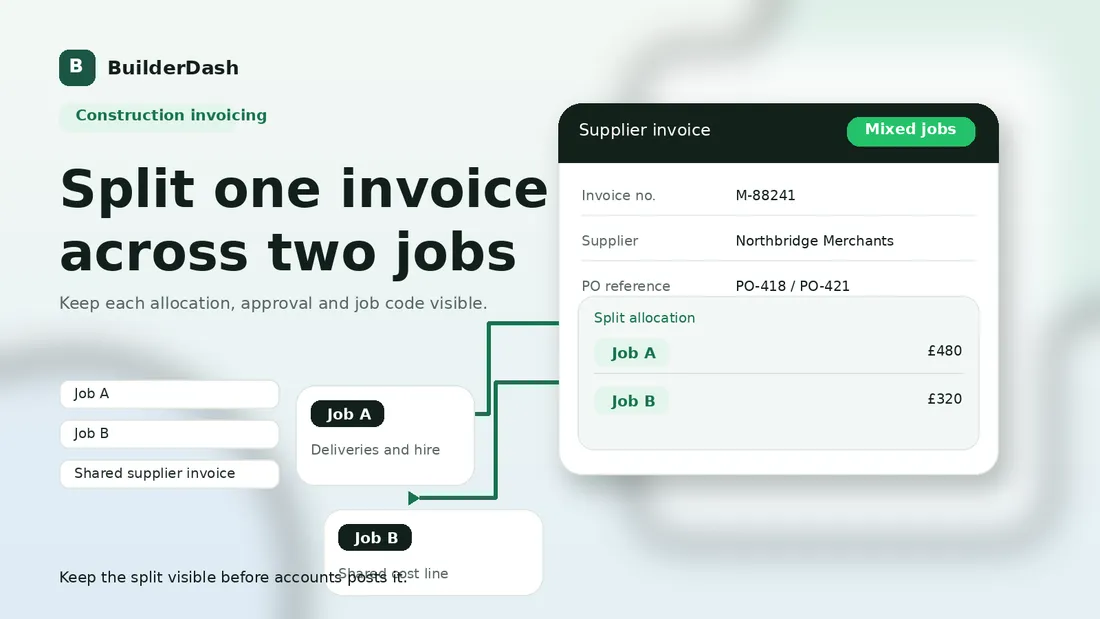
A single supplier invoice does not always belong to one job.
That happens all the time in construction. A merchant invoice covers materials delivered to two sites. A plant hire bill spans a shared machine on neighbouring jobs. A waste or skip charge needs apportioning across a refurbishment floor and a snagging package. The office still has to turn that one invoice into clean job costs.
If the split happens late, accounts ends up guessing. If the split is left to memory, the job costing report becomes harder to trust. The answer is to capture the basis for the split before the invoice is posted, not after someone has already filed it away.
Why one invoice can belong to more than one job
Construction work is rarely neat enough to keep each cost in a separate box.
A supplier may issue one invoice because:
- materials were delivered to several sites on the same round
- plant was used by more than one job during the same period
- one order covered both a main package and a small variation
- a contractor bought consumables in bulk and shared them between jobs
- the invoice covers a mixed delivery to a depot, a site, and a return load
That is normal. The problem is not the mixed invoice itself. The problem is when nobody records how the cost should be divided.
When that happens, one of three things usually follows:
- The full value gets posted to whichever job is easiest.
- The cost sits in suspense until someone has time to work it out.
- The invoice gets split from memory, with no clear evidence trail.
None of those outcomes is good for job costing.
What goes wrong when the split is left to bookkeeping
If the split is handled too late, bookkeeping becomes the place where commercial decisions are guessed rather than checked.
That creates familiar issues:
- one job looks overstated because it absorbed too much of the supplier invoice
- another job looks healthier than it really is because its share was never posted
- project managers cannot see which site paid for what
- the accounts team has to chase staff who no longer remember the original order
- audit trail gets weaker because the split basis lives in email, not the invoice record
It also makes disputes harder. If a supplier query comes back later, the business may know the total invoice was wrong, but not which job line was affected.
The result is a small reconciliation task turning into a margin problem.
What to capture before you split the invoice
The cleanest split starts with a few simple checks.
Before the invoice is posted, make sure the record shows:
- the supplier name and invoice number
- the original purchase order, if there was one
- each job, site, or project code that should receive part of the cost
- the value or quantity assigned to each job
- the reason for the split
- the person who approved the allocation
- any delivery note, hire sheet, timesheet, or site evidence behind the split
The key point is that the split needs a basis, not just a total.
For example:
- 6 bags of plasterboard to Job A and 4 bags to Job B
- 3 days of plant hire split 50/50 across two nearby sites
- £180 of consumables allocated to the fit-out floor and £120 to snagging
- skip hire divided across two phases because both generated the waste
If the business cannot explain why the amounts are split that way, it should not treat the split as settled.
A simple way to record the split
The easiest rule is this: the invoice can be one document, but the allocation should not be one line.
Each job should get its own posting line, allocation record, or cost entry. That way, accounts can see the logic instead of seeing one blended total and a note that says "split later".
A practical split workflow looks like this:
- Receive the invoice and check whether it references more than one job.
- Match it to the PO, delivery note, hire sheet, or other evidence.
- Confirm the basis of the split with the project manager or site lead.
- Record each allocation against the correct job code or site reference.
- Keep a short note explaining why the split was made.
- Query the invoice if the split is not supported by the paperwork.
That last point matters. If the office cannot support the split, it is better to pause and ask than to force the cost through on assumption.
Keep the evidence with the cost
The split is only useful if the evidence stays attached to the cost.
That means keeping the supporting detail alongside the invoice record rather than scattered across inboxes. A good file should make it easy to answer:
- what was ordered
- where it was delivered or used
- which jobs received the cost
- who approved the split
- whether any part of the invoice is still under query
This is where many construction businesses lose time. The invoice is in one system, the delivery note in a photo folder, the approval in WhatsApp, and the job reference in someone’s head.
If that happens, the split can still be correct, but nobody can prove it quickly.
The control question to ask before posting
Before posting a mixed invoice, ask one simple question:
Can someone else understand this split in six weeks without asking the person who made it?
If the answer is no, the record is too thin.
A good split should be understandable by accounts, the project manager, and the director without a reconstruction exercise. That is especially important at month end, when several mixed invoices can hit the same job report at once.
How BuilderDash helps keep split costs visible
BuilderDash is useful here because the invoice check, the job reference, and the approval trail should live in one place.
Instead of relying on a final spreadsheet note, the business can keep the allocation tied to the same workflow that already handles purchase orders, approvals, and invoice review. That makes it easier to see which part of a supplier invoice belongs to which job before the cost is posted.
For contractors that run multiple live jobs at once, that visibility is often the difference between clean cost control and a pile of post-hoc corrections.
Suggested internal links
- Why project codes and site references matter on materials invoices
- Why delivery notes matter before materials invoices are approved
- How to reduce end-of-month invoice chasing in construction
- What to check before a construction payment run
Call to action
If one supplier invoice needs to hit more than one job, standardise the split before it reaches accounts.
That usually means a clearer job code, a short allocation note, and the supporting evidence in the same workflow as the invoice. BuilderDash can help keep that trail visible so the split is easier to trust and easier to review later.
Run your projects properly with BuilderDash.
One system for every enquiry, job, quote and invoice - built for project-based trades, not reactive call-outs.


